We can check your plugins and stuff

Thursday, March 14, 2013

Enable best settings for Photographs in Firefox

Friends you all know I am great fan of the Mozilla Web browser Firefox. Along with tech and Linux Digital Photography is also something that makes my heart flutter :) Here is a quick guide to enable optimal setting in your Firefox for displaying the best looking photos.

Go to address bar type about:config  and press enter.. now in the search bar type gfx.color
press enter. You should see the following entries with there default values.

gfx.color_management.enablev4   ----- false

gfx.color_management.mode    ------- 2

gfx.color_management.rendering_intent ------ 0

gfx.color_management.display_profile ----- blank

Now before we go on tweaking the settings make sure that you are set to use Color management at the OS level. I use Fedora Linux with KDE 4.10.x which has system wide color management enable.
For Windows look under Control Panel > Color management. Make sure the OS load the correct ICC profile for the monitor that you have.

You can also use the model specific tool for this.. for e.g my Samsung SyncMaster came with software to load the correct monitor profile and color setting tools. Check you vendor web site for updates or patches for your model. Now once we have a color profiled monitor and OS ...

Toggle gfx.color_management.enablev4   --- True.

Possible values and their effects

False    (default) Version 4 is not enabled
True    Version 4 is enabled

gfx.color_management.rendering_intent   change to    -1


Possible values and their effects


-1   
Honor the rendering intent specified in the image file.


0    
Perceptual 
(Default)


1    
Relative colorimetric

2    Saturation

3   Absolute colorimetric


gfx.color_management.mode  change to 1 


Possible values and their effects

0   Disable color management.
1   Enable color management for rendered graphics.
2  Enable color management for tagged graphics only. (Default)

"Value 0" equals "Color management disabled" — This means different things depending on the Operating System:

OS-X, Windows: RGB 'numbers' are passed straight to the monitor unchanged. 

"Value 1" equals "Full color management" — This means everything tagged is Converted to Monitor RGB, and everything untagged is Assigned sRGB and then Converted to Monitor RGB.

"Value 2" equals "Color management applied only to tagged images" — This means Tagged files are Converted to Monitor RGB and untagged RGB is sent straight to the monitor unchanged.

That's all it that simple to have better Photographs in Firefox, restart the web browser. If you find all this manual editing a bit of hassle use the "Color Management" add-on to do the same. Have fun :) 


Wednesday, February 13, 2013

Boost your safety online

Hello today we will look at a few quick tweaks to boost the level of security while surfing online using the awesome Mozilla Firefox web browser.

Launce FireFox  Go to Preferences > Advanced > Encryption

Make sure Use SSL 3.0 and Use TLS 1.0 are both enabled (tick box checked)


What is being done - we are using setting SSL to use a higher grade encryption.


Now type about:config in the address bar. Press enter.
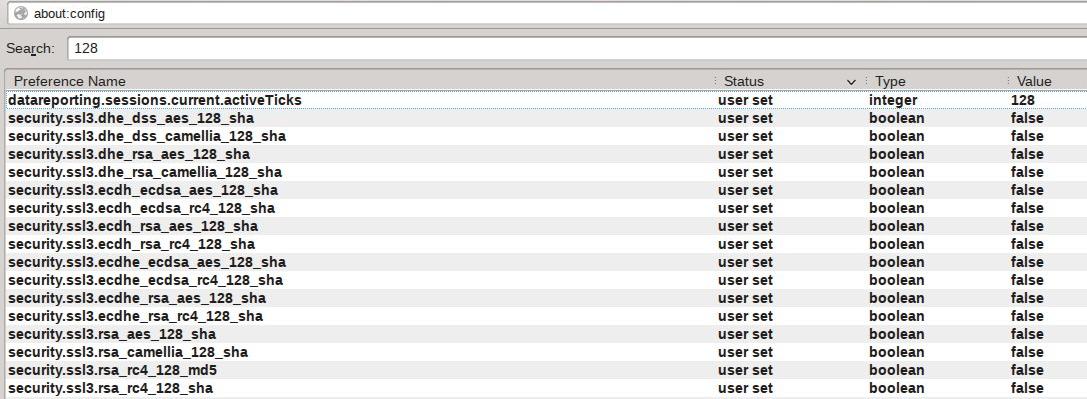
Type 128 in the search bar. Press enter. Now toggle the following entries to "False".


What is being done - we are disabling the low bit rate ssl to force use a higher grade encryption.


Now type 256 in the search bar. Press enter. Now toggle the following entries to "True" if they are not already set to "True".


What is being done - we are using setting SSL to use a higher grade encryption.


Type 'ssl.' That's ssl and a '.' in the search bar. Press enter. Now toggle the following entries to "True".

What does these setting do -

security.ssl.enable_false_start - "True" will help speed up the ssl lookup.
If this setting breaks the site that you use, set to "false"

security.ssl.require_safe_negotiation - "True" make sure that any possible Man-in-the-middle attacks are stopped.
If this setting breaks the site that you use, set to "false" 

security.ssl.treat_unsafe_negotiation_as_broken - "True" make sure that any possible Man-in-the-middle attacks are stopped.
If this setting breaks the site that you use, set to "false" 

Type 'geo.enabled' in the search bar. Press enter. Now toggle the following entries to "False".

What does the setting do - It disables the geographical tracking that is enabled by default. Improves privacy while web surfing.

With these simple tweaks you can enable a much safer web surfing experience. Sometimes few web sites may not work properly when using higher grade encryption (which is a bad design fault at there end - really) . In that case just temporally enable one of the 128 bit setting and reloaded the page to make them work (disable normally). Happy safer web surfing.

Friday, January 25, 2013

How to install better drivers for Intel LAN card in Fedora 18

Well well me hearties Fedora 18 is out and so sooner or later will be the so called tweaking guides. Toady we will look at how to get the latest and greatest Intel LAN e1000e driver installed on to your Fedora 18 system.

Under a root Konsole type the following :

 dmesg | grep e1000e

you should see something like [    9.400870] e1000e: Intel(R) PRO/1000 Network Driver - 2.1


Visit http://sourceforge.net/projects/e1000/files/e1000e%20stable/2.2.14/e1000e-2.2.14.tar.gz/download

and download the latest driver. This should give you a file e1000e-2.2.14.tar.gz

now under the folder where the file has been downloaded issue the following command.

rpmbuild -tb ./e1000e-2.2.14.tar.gz

If you get any dependency errors install the missing files .. if all is well you should get the latest e1000e driver rpm

now issue the following rpm -Uvh /root/rpmbuild/RPMS/x86_64/e1000e-2.2.14-1.x86_64.rpm


Preparing...                          ################################# [100%]

reboot the system 

...

dmesg | grep e100
[    9.400870] e1000e: Intel(R) PRO/1000 Network Driver - 2.2.14-NAPI
[    9.400873] e1000e: Copyright(c) 1999 - 2012 Intel Corporation.

There you have the latest and greatest Intel e1000e LAN driver installed :) :) 


--- Important Update ---

I have just noticed that if you upgrade the kernel ... the system reverts to old 2.1x series of e1000e network driver. As the driver is compiled against the current kernel, here are the instruction to updated them to the current version.  After you have updated the kernel and rebooted once..

# service network stop
# rmmod e1000e
# rpmbuild -tb ./e1000e-2.2.14.tar.gz
# rpm -Uvh /root/rpmbuild/RPMS/x86_64/e1000e-2.2.14-1.x86_64.rpm --force
# modprobe e1000e
# service network restart

Check to make sure ---
dmesg | grep e1000e


[13226.725837] e1000e: Intel(R) PRO/1000 Network Driver - 2.2.14-NAPI
[13226.725842] e1000e: Copyright(c) 1999 - 2012 Intel Corporation.
[13226.725889] e1000e 0000:00:19.0: setting latency timer to 64
[13226.725986] e1000e 0000:00:19.0: Interrupt Throttling Rate (ints/sec) set to dynamic conservative mode
[13226.753249] e1000e 0000:00:19.0: irq 46 for MSI/MSI-X
[13227.015084] e1000e 0000:00:19.0 eth0: (PCI Express:2.5GT/s:Width x1) 00:1c:c0:0f:ae:40
[13227.015089] e1000e 0000:00:19.0 eth0: Intel(R) PRO/1000 Network Connection

Thursday, August 9, 2012

Musing on Windows 8

MS has released Windows 8 RTM and very soon the product will see a worldwide release . I have been using the Windows 8 Developer preview. Here is my personal take on Windows 8 Dev experience ---

Pros ---

Is arguably the fastest Windows version with supported hardware.
Security is built upon and improved since windows 7 days.
Over all RAM requirement has reduced (services and apps takes less RAM as compared to Windows 7)
Spot fixing and live repairing of NTFS volumes is very cool.
Power management features are very good.
Would make a good OS on tablets and on the go/live/connected laptops/ultra-books etc (lots of improved wireless connectivity options)
Metro UI or the simple phone'ish UI is good for new users/people used to mobile phones menus/system.

Cons ---


On older hardware you will have to manually install the latest drivers. I tested with a mobo that has as Intel G33 graphic card... unlike Windows 7 which installs the base driver Windows 8 does not only a basic driver is installed. So if you are planning to use it on old or even ancient hardware hmm... keep hunting fro drivers.

Metro sucks!!! Power users struggle with it (my personal opinion). It may be the next big thing in GUI but I have older hardware (no touch and pen input device)
The old Classic Desktop still rules for my personal usage.
Open GL drivers not working for Intel hardware
The compatibility wizard really sucks and does not work many times, many popular apps that work fine under Win7 do not work e.g Virtual Box , open arena games , zenmap , SilkyPIC
The teal/green colors are a eye sore
Too much online/cloud this cloud that... if your work primarily is on apps/progs that require live Internet net access only some times e.g Photo editing/video edition/accounting etc you are much better off with Windows 7
The new STOP error screen totally sucks and if you are a windows power user/IT admin... you will be at a loss as hardly any useful info is provided on screen

Mix bag issues ---

These issues can be a boon or a ban, depending who you are. A simple end user or a IT admin/geek!!!

The OS even though in beta testing is very stable, and rock solid.
Automatic repair to the FS works very well.
Dual booting with another non MS OS is NOT a good thing.

The volumes under NTFS are monitored via CRC FS filters and transaction logging... even if you have not encrypted the volume ... the entire volume is monitored via low level File System Filters and check sum. Copying files to the drive from say a Linux live boot CD or Linux installed on another disk (with full NTFS read write support) would still result in marking the volume as bad.. will result in data loss.

Installing any new prog/app from the Internet goes through strict review of the "application compatibility database" which is maintained and controlled by MS... and flags many proper admin/IT tools as harmful/incompatible e.g nmap, wireshark, virtualbox. On the other hand this feature alone will stop many end users from installing any spyware/trojan laden progs/apps accidentally. As it clearly prompts the user to delete the file. In my beta testing I was not successfully in submitting apps/progs to the white-list even once.

If the OS crashes the automatic recovery is very good and work without any user intervention. Normal end user would be happy with this. Power users/IT admins would feel the pinch as the OS tries to hide as much of it core components that we are use to e.g the registry , STOP errors, last know recovery option, critical log files/folders are now even hidden from the administrator account. One has to go do some real reg hacking and xcals magic to access them.

Anti virus in the form of Windows Defender is just a rehash of Microsoft Security Essentials, with the same core engine, (which is again based of the Forefront engine)... I am a big fan of MSE as far as a free antivirus product goes.. It may not be the best or even the lightest on resources.. but is a very good addon for a free product.

IE or the loved/hated Internet Explorer.. truth be told it has improved in many ways and is very fast. The stability has also increased a lot since the old days (but security wise it is still an open question) I personally avoid using IE for any personal use as far as possible. That being said long time users will have a good experience to look forward to.

On the business end IE will not die, not yet. Do not be fooled by HTML 5/web apps hype bandwagon -- Two Words "Active-X" many big and small company still rely and work with Active-X ... prime e.g begin the various Sibel plug ins which are hugely popular as a CRM/B2B/B2C fronted

If you are the type of person that like to tweak/hack/modify you OS too the teeth, or just to try out something new Windows 8 will kinda disappoint you. MS is locking down the OS more and more overlaying the OS with dumb On/OFF options like that another OS ;) Many low level utilities and prog/apps will not work as a result of kernel level changes, driver/filter changes and sometime pure superficial blocks in places. On the other hand the fundamentals and base that the OS is based on is very solid. In fact from what I have seen so far at the low level and kernel design. I am very excited to see and test out the next Server version based and expanded o the same technologies. Em.. Windows 2013 Advance Server anyone ???

Tuesday, December 6, 2011

RAW vs JPEG file showdown

Well some times I get mails and questions like ....  keep hearing about something called RAW what is a Raw file ??? Should I use the RAW mode of my camera ??? RAW mode is slow why should I use it.. Jpeg or RAW which is the best and why ???

OK so here we go ...

What is a JPEG file:

Simple answer: A graphic file type that is almost universal and can be opened anywhere. Is small in size. Offers good to decent image quality.

Technical answer: The name "JPEG" stands for Joint Photographic Experts Group, the name of the committee that created the JPEG standard and also other standards. The JPEG standard specifies the codec. A codec is a device or computer program capable of encoding or decoding a digital data stream or signal. The word codec is a portmanteau of "compressor-decompressor" or, more commonly, "coder-decoder".

Which defines how an image is compressed into a stream of bytes and decompressed back into an image, but not the file format used to contain that stream. The compression method is usually lossy, meaning that some original image information is lost and cannot be restored, affecting image quality. There is an optional lossless mode defined in the JPEG standard; however, that mode is not widely supported in software products.

What does a JPEG file contain: 
  •     Color space definition
  •     Component sub-sampling registration
  •     Pixel aspect ratio definition.
What is RAW file:

Simple answer: A graphic file type that is different for each company or even camera model no. (e.g Canon .CRW and .CR2 files). RAW files are much bigger in size. Offers the best image quality. RAW files require special software to open and edit. A camera raw image file contains minimally processed data from the image sensor. Raw files are so named because they are not yet processed and therefore are not ready to be printed or edited. Normally, the image is processed by a raw converter software.

Technical answer: Raw image formats are intended to capture as closely as possible (i.e. at the best of the specific sensor's performance) the radiometric characteristics of the scene, that is, physical information about the light intensity and color of the scene. Most raw image file formats store information sensed according to the geometry of the sensor's individual photo-receptive elements sometimes called pixels rather than points in the expected final image: sensors with hexagonal element displacement, for example, record information for each of their hexagonally-displaced cells, which a decoding software will eventually transform into the rectangular geometry during "digital developing".

Raw image files are sometimes called digital negatives, as they fulfill the same role as negatives in film photography: that is, the negative is not directly usable as an image, but has all of the information needed to create an image. Likewise, the process of converting a raw image file into a viewable format is sometimes called developing a raw image, by analogy with the film development process used to convert photographic film into viewable prints. The selection of the final choice of image rendering is part of the process of white balancing and color grading. Like a photographic negative, a raw digital image have a wider dynamic range or color gamut than the eventual final image format, and it preserves most of the information of the captured image. The purpose of raw image formats is to save, with minimum loss of information, data obtained from the sensor, and the conditions surrounding the capturing of the image.

What does a RAW file contain:

  • A short file header which typically contains an indicator of the byte-ordering of the file, a file identifier and an offset into the main file data.
  • Camera sensor metadata which is required to interpret the sensor image data. This includes the size of the sensor, the attributes of the CFA and its color profile.
  • Image metadata which is required for inclusion in any CMS environment or database. These include the exposure settings, camera/scanner/lens model, date (and, optionally,place) of shoot/scan, authoring information and other. Some raw files contain a standardized metadata section with data in Exif format.
  • An image thumbnail. Optionally a reduced-size image in JPEG format, which can be used for a quick and less computing-intensive preview.
  • The sensor image data
Ok all this info is awesome and all but, too much info and computer tech doodle. Can you give me some simple easy to use information ;) ...Sure

JPEG versus RAW:
JPEGs are:
Faster to shoot
Faster to Save
Smaller in file size, consequently you can save many more panos/images on a drive.
Can be opened/edited in just about any graphics program
Cross-platform
Little or no learning curve
Anyone or almost any camera can shoot JPGs
8-bit files (only 256 color per channel)
Limited ability to color correct
Generally, you need to bracket in ONE f-stop increments.
Very limited in overall detail, but especially in highlight and shadow details
(in other words dark areas go black quickly and highlights go completely white quickly)
Better for shooting "journalistic" or fast moving/changing scenes, especially with people in them.

RAW files are:

Slower to shoot
Slower to save (More bits = bigger file size = more hard drive space needed = less images can be saved to a hard drive)
Larger in file size (14-bit RAWs are about 25% larger than 12-bit RAWs)
12-bit files have 4096 colors per channel and 14-bit files have 16,384!
Are "proprietary" per camera manufacturer and even within a single manufacturer
(i.e.: Canon) they have multiple RAW formats (i.e.: .CR2 and .CRW)
Much more exposure latitude, consequently fewer photos to cover a large exposure range.
(i.e. 3 RAW files can cover a range that 5 or 6 jpegs would be needed to cover)
This also means less bracketing!
Ability to change color temperature after its been shot.
Have to be "processed" in a digital darkroom (i.e.: Adobe Lightroom) and then saved as secondary file such as Tiff, JPG, EXR, etc.
Are Non-destructive! At this point, RAW files cannot be saved. Therefore you can always go back to the original and make additional corrections.
Are naturally a bit "soft" looking. RAW files are INTENDED to be sharpened, so some photographers have a hard time switching for that reason alone.

**Special note -- Cameras with a small sensor size like many Pro zoomers and Four-micro systems. Using ISO speeds of over 800 or more generally results in bad quality or lot of digital noise. Using a RAW file will always give you better results after De-nosing/noise removal than using a jpeg.

In terms of colors, what is the difference between 8-bit, 12-bit, 14-bit, and 16-bit files?
    • 8-bit files: 256 colors (shades of gray) per RGB channel
    • 12-bit files: 4,096 colors (shades of gray) per RGB channel
    • 14-bit files: 16,384 (shades of gray) per RGB channel
    • 16-bit files: 65,536 colors (shades of gray) per RGB channel

Cool so still why use RAW ??
In terms of practical application, having more bits per channel basically means more subtle/smoother color variations, more highlight, and more shadow details are
available.This simply means that you will have more rich and bright, vibrant colors = better looking photographs. Personally, I always try and shoot RAW. Once you go RAW, you never want to go back to the “old” way. (Assuming you know how to properly process them)

Nice how do I start with RAW files and what software is needed???

Set your camera to RAW mode. Start shooting. For basic simple level editing of RAW files use IrfanView free get it at http://www.irfanview.com/

For proper full "processed" RAW file in a digital darkroom use Adobe Lightroom or
Raw Therapee free get it at http://rawtherapee.com/

Then saved as secondary file such as Tiff, JPG, EXR, PNG.
I recommend using PNG over JPG much better quality and decent file size.

Why not use RAW files ??
You have a old and slow computer.
Full and proper RAW processing requires a fast computer with lots of RAM.
RAW files take a lot of space, so if you are running out of disk space it is better to use JPEG.
You mainly shoot to upload the photos online, best possible quality is not an absolute requirement.
You do not want to learn new software and do any type of digital processing.
Developing/Processing RAW files is a time consuming activity. Which may lead to excessive consumption of Coffee, jolt cola, red bull and other such energy drinks ;)
You are pressed for time, you just need basic edit, crop, save. Use jpeg
You are just plain lazy ;)

Disclaimer: Parts of this post were sourced from the Internet and placed here for easy and quick reference.

Sunday, November 13, 2011

Don't let the spammers get you!!!!!

A few days back I helped an acquaintance help recover and secure his/her cracked yahoo account. The hack was typical ruse played by the spammer, after taking over the account the entire contact book was copied. Deleted the original contact book from the email account. Make a fake new account by adding a letter to the original account. Set up a filter to auto forward all mails received to this account, also set a filter to add a blind carbon copy to another account (This is done so just in case the original account is recovered ... via password recovery and secret question. to monitor what is going on by the cracker).

The person concerned was worried as all his/her contact were deleted from the account and he/she suspected it was a hack attempt by a business rival. I had to scan ,examine and check the laptop for any attempt of deliberate cracking. The initial scanning and testing showed that the laptop was not secure by any stretch of imagination.

Multiple and glaring security omission were noted. The OS was not patched with any service packs and hot-fixes released thereafter. The account in use was an administrator level account. The system did had antivirus software installed ... but it was something I would not recommend to anyone. It has a known poor detection rate and does not protect from any web attacks like script based worms, code injection etc. Worst of all it does not have a dedicated anti root kit and anti spyware component. To top this all multiple Service Packs and patches were missing from popular software like MS office, web browsers, browser addons, old java virtual machine. All in all the system was crying to be taken over sooner or later.

Now on the actual ruse played by the cracker. As mentioned the cracker deleted the original contact list. Before doing this the entire address book was sent a mail .... this mail is typical of the phishing attack we see these days. All the contact were told that the owner of the account was stranded in Spain and had his/her Visa taken away. He/she pleaded them to send him money via online transfer so he/she could be back into his/her hotel and get back home safely. The actual account holder had been getting concerning calls since early morning from people all over the world. Some had also fallen for the con and replied to the mail. 

The reply was auto forwarded to the fake email account and details was sent back of a temporary western union transfer account to wire the money. Even a contact number was given in the fake mail. (Do not call such numbers as they could be ISD calls/Premium rate numbers or and even a collect call. You may end up paying a large amount in call charges). Sadly in this case a few people did sent some money. (If you are in such a fix always make sure to contact the actual person on his/her known landline or cellphone) 

The victim was educated on how to secure his/her laptop and update the OS and other software's. Email account setting were restored to normal, password changed and make use of strong password and features like Secure Text/Picture of yahoo. Account logs were checked to find that the crackers first accessed the account from Kenya and later from Australia. (At this point it is not clear if they were the same person/group using proxy servers or working over the Internet.)  All spoofed emails/headers/IP address details were noted and saved. The victim was advised to contact people in his address book to not to respond to any such emails. File a cyber crime report with the local cyber crime cell, and submit the details as evidence.

Conclusion: The ruse played on the emotion of the people in the address book to skim off money via online transfer. The address book was deleted to avoid let the people know that the mail was fake. If you have been using an email account for a long time, it is a good idea to take a backup of your contacts. Check all filters/forwarding setting and make use of all security features possible. Use common sense and contact the person on a known number to confirm of any such event.


P.S --- Case of the Internet con to get a good job!!!!!

Received a similar mail today that tries to exploit on another human emotion. This one is pure con, and promised you a very lucrative job offer. No hackers or hi tech involved.. in fact the attachment it's self is a plain text file. No virus or trojan etc. 


MARUTI SUZUKI INDIA LTD (MSIL)
Head Office Maruti Suzuki,
India Limited Nelson Mandela Road,
Vasant Kunj, New Delhi-110070.

REF: "MARUTI SUZUKI" DIRECT RECRUITMENTS OFFER.

Your Resume has been shortlisted for our new plant.The Company selected 45 candidates list for Senior Engineer IT,Administration,Production,marketing and general service Departments, It is our pleasure to inform you that your Resume was selected as one of the 45 candidates shortlisted for the interview.

The Company SUZUKI is the best Manufacturing Car Company in India, The Company is recruiting the candidates for our new Plants in Delhi,Bangalore, Pune and Mumbai.Your interview will be held at The Company Corporate office in New Delhi on 23rd of November 2011,at 11.30 AM, you Will be pleased to know that the 45 candidates selected 34 candidates will be giving appointment,Meaning that your Application can progress to final stage. You will have to come to the Company corporate office in New
Delhi,your offer letter with Air Ticket will be sent to you by courier before date of interview.

The Company can offer you a salary with benefits for this post 62, 000/- to 200, 000/-P.M. + (HRA + D.A + Conveyance and other Company benefits.The designation and Job Location will be fixing by Company HRD. At time of final process.You have to come with photo-copies of all required documents.

REQUIRED DOCUMENTS BY THE COMPANY HRD.
======================================
1) Photo-copies of Qualification Documents.
2) Photo-copies of Experience Certificates (If any)
3) Photo-copies of Address Proof
4) Two Passport Size Photographs.
5) Mobile Number


Please note: All requirement should be sent to this email:
maruti_cars@hotmail.com

You have to deposit the (Cash) as an initial amount in favor of our company accountant name in charges to collect your payment department for Rs.16,200/- ( Sixteen Thousand two hundred rupees ) through any [STATE BANK OF INDIA] OR [AXIS BANK] Branch from your Home City to our Company accountant name in charges. Account NO:,which will be sent to you upon your response. This is a refundable interview security. Your offer letter with Air tickets will be sent to your Home Address by courier after
receiving the confirmation of interview security deposited in any of the STATE BANK OF INDIA OR AXIS BANK.
This Company will pay all the expenditure to you at the time of face-to-face meeting with you in Company. The Job profile, salary offer, and date -time of interview will be mentioned in your offer letter. Your offer letter will dispatched very shortly after receiving your confirmation of cash deposited in STATE BANK OF INDIA OR AXIS BANK.
We wish you the best of luck for the subsequent and remaining stage.The last date of security deposits in bank is 20th of November, 2011. You have to give the information after deposited the security amount in bank to the Company HRD-direct recruitment via email.Your Offer Letter with supporting document will be dispatched same time by courier to your postal address after receipt of security deposited confirmation in bank. The interview process and arrangement expenditure will be paid by SUZUKI COMPANY.Lodging, traveling and local conveyance actual will be paid by MARUTI SUZUKI COMPANY as per bills. The candidate has to deposit the initial refundable security as mentioned by HRD.NB: You are advice to reconfirm your mailing address and phone number in your reply.And 16,200/(Sixteen Thousand two hundred rupees) will be the refundable amount,as 200rupees will be deducted as bank charges for funds deposit and if you are been selected or not, still the amount will be refunded to you,as the amount is just to prove that you will be coming for the interview in order for us not to run at lost after sending you the air ticket Offer Letter and you don't show up on the day of interview.

Wishing you the best of luck.

Regards,
Shinzo Nakanishi
Chief Executive Officer, Managing Director,
MARUTI SUZUKI INDIA LTD (MSIL)

_____________________________________________________________________________

Conclusion: Now you have to use common sense, some of the details may be true. But how in the heaven I am being offered a job at MARUTI SUZUKI when I did not even apply. My CV is not even online at any job portals :P :P LOL. By reading the text marked in RED, it should be very clear that this is an attempt to rip you off the money and IS TOTALLY FAKE.  Do not send any details or the money to them. A company like MARUTI SUZUKI (automobile makers) will never use a Hotmail id to send you official emails from HR.

Gmail is not marking such mail as spam right now. If you happen to get such a mail, mark it as spam. Report to the company involved of the ongoing scam. Tell the world, your friends and your dog about this. Save them all :)
Be safe...

Friday, November 4, 2011

Some personal musing on Linux...

Have been using Computers since early 80's old fond memories of chunky, springy old BBC micro keyboards back at school as small kids... staring at the small burning phosphor orange or green screens... it was all 'awe' and 'awesomeness' .. LOGO and turtle :D :D fun times.

Till early 90's I did not even own a personal computer... by mid-late when I did get one it costed an arm and leg. Had no idea about "free software"... back in the days one friend had a fast PC with the Pentium Pro chip ... we got hold of a Slackware CD via a popular computer mag.. booted with it and borked the windows 95 boot loader... I had to literately had to take the slack ;) for that... It was good I knew how to re-install Windows.

We had no Internet and support to speak of... First there was shell/acc (which was too expensive) and the dial up modems. I recall few people had heard of Linux/GNU in our circles. I once subscriber to a national level mailing list... as my software modem (sm56) would not work under Linux...  I was overwhelmed by the huge 
volumes of emails in my inbox. Over 300 mails in 2 days.. It did not make any sense too.. (to be true mostly flame wars and ego trips). Had to unsubscribe in just four days.  

I was given the typical RTFM treatment, and asked to grind the soft modem type advise... being on dial-up and raking up huge phone bills... where I was paying by the seconds did not help.. need less to say I was put off .... 
After a few years I did try Mandrake Linux and that did work with my dial up. I had to actually mail the maintainer of sm56 kernel module maintenance. He was kind enough to write out step by step commands. I did a actual compile of a custom kernel and module.. all without  realizing the depth or importance  of it. All I remember is that it took like three hours and forever.....  on my PIII :P

For years I did not look at Linux as a full time indulgence... things moved on the tech sphere.. was lucky to have indirect access to high speed Internet access via VSAT and ISDN via few government and research facilities. Saw them using Unix and Linux full time, the bug was on :)

A Indian tech mag had a big role in my trying Linux properly. There was a lot of useful discussion and proactive help. I even ended up been one of the unofficial beta tester for the distro they rolled out in '04, '05 and '06. After this there was a on and off spell of Linux Distro hopping ... Had a good run with the Sarge DVD... Fedora Core series. By now had seen all sorts of holy wars and flame wars on every thing under the sun from to call it GNU or not, KDE vs Genome, rpm vs apt vs yum, Windows vs rest of the to Open source world, happening/not happening Desktop Linux.  I had ADSL by this time, bills were reasonable now. 

Linux became main stream, at least usable for semi techie people. Lots of info on the Internet in the form of How-to, guides, web sites, and even videos. Major changes in hardware and better compatibly made things easy. Like all things tech ... things are moving at a rapid pace...  In all this my major observation is that the end user should have access to decent Internet speed. If he/she is driven enough the support and proper info can be found to make Linux work. Today points such as games/office suits/XYZ software on Linux is often mute. It works and works well indeed.
Major changes in hardware and virtualization technology, better and easy desktop environment, great hardware support in the latest stable kernels also made it easy for non *nix users to try out Linux and use it.  Now you do not have to a OS guru to install Linux. Don't want to install it just give a Live CD a try... it almost a non issue.

Now we are seeing a new wave of support issues, many places still don't have xDSL/cable or fiber. Many  people are on slow connections like GPRS, dial up even today. Many have just begun to taste the fruits of 3G wireless Internet. From what I have seen is 3G can be great enabler and can even used at places that do not have land-lines/xdsl. In this way my friends in the western countries are way better off.
For them it is just a matter of minutes or less then an hour at the maximum to try a new release DVD. On the other end for many of us it is still no fun to wait and keep downloading a DVD of around 4GB after several days. 
For what I see it is not some magical feature or the next killer app that helps in major Linux adaption, but it is rather the available of cheap data plans and faster Internet connection. Better hardware support for wireless devices like 3G HSDPA USB modems, pain less support for "tethering" with mobile phones. The Internet is "THE" medium of all types of content delivery , be it the all elusive killer cloud app or Linux adoption for the masses.    

Sunday, August 14, 2011

Pseudo-name aftermath

Well Google+ is going after all the profiles with a pseudo name or nick name at least they say so. My own Google+ profile was suspended for some time due to this. I did change the name as I do like Google+, but still think it is a shortsighted policy and does not really mean anything in the grand schemes of things. It is too damn easy to create a fake email id and sign up with a nick or Pseudo name. Both side for and against the Real vs fake name have valid arguments and are partially correct.

Too many people have signed up with nick names or pseudo name to begin with. Google will never be able to remove all the profiles with pseudo name or nick name. It is a lost cause and people will find ways and means to bypass this. In the days that followed Google has made several changes to the policies. It is a good thing they do listen to feedback. After I had mailed them that link to previous blog entry. We have seen few changes on Google+.

  • Google+ changed the way the profile block notice is served. Now if you profile is suspended as soon as you login you get the prompt. No more mysterious errors to post and wondering what the foo is happening ...  


You can still press the 'Esc' key and ignore the message. You will still be able to check you updated in your Streams. but you will not be able to post anything or +1 any post/thread. Picasa and Buzz will be disabled as long the Google+ profile is suspended.

  • Google is now clearly saying it my way or the highway. The notice gives you links to take/remove all you data and delete the Google+ profile. YES that is right they are saying make the changes to comply to the name policy or buzz off. 
  • It is a good thing in the event you decide that enough is enough. In the event you are unable to comply with the  names policy, you can still take all your content with you, even after your profile is suspended. 
  • Now Google+ has a 4 day grace policy. As per the announcement by Saurabh Sharma, a product manager on the Google+ team. "Starting today, if we find that your profile name does not adhere to our policy, we’ll give you a 4 day grace period to fix your profile name before we take further action. During this period, you can continue to use Google+ as usual. We're hoping that most affected users will be able to quickly fix their profile name while continuing to enjoy all that Google+ has to offer." 
  • Google+ has also issues a video to highlight these points. 


There is a lot of hot discussion going on this topic. If you are on Goggle+ do check them and voice your opinion.

https://plus.google.com/117903011098040166012/posts/asuDWWmaFcq
https://plus.google.com/105822688186016123722/posts/1uDUxJfEHF9

If you're an EU Google Account holder, you can write a complaint to your local Google offices, then if they fail to reply and take corrective action, take them to your EU nation's information commission. You can find their offices here - http://www.google.com/intl/en/about/corporate/company/address.html so start the letter writing.

Just checking over this, but it does look like "Google Profiles" breaches european privacy law, specifically "The Privacy and Electronic Communications (EC Directive) Regulations 2003"'s section 18 on directories of subscribers. Basically, anyone running a communications service in the EU who publishes a public directory, has to allow subscribers an opt-out from this directory or allow them to be entirely selective as to what if any information is published about them.

Update: As Google operate Gmail and Gtalk services to EU subscribers, they are covered by this legislation. It does look airtight, Google are required by EU law to allow the subscribe full control over what is and is not made public on their profile. And they may even require google to make their profile entirely private.

After cross checking users have found out after contacting the Data Commissioner's office, and have been instructed they  do appear to have a legitimate grounds for complaint against Google, as does any other EU account holder, and they should write a written complaint to their offices at.

Data Protection Officer
Google London
Google UK Ltd
Belgrave House
76 Buckingham Palace Road
London SW1W 9TQ
United Kingdom

Tuesday, August 9, 2011

Ridonklus I say!!!!!!!!!!!

Woke up this morning and logged into my Google+ plus account was checking out the updates from my various circles and enjoying my morning coffee. Noticed that the order of my circles were not at what I had set them at. Did not make a big deal of it... more coffee and surfing at Google+ ... As many of the regular readers of the blog will know that I am a big fan of KDE and digiKam photo management software. That from time to time I keep posting bits about both and beta test/file bug reports for them.

Along the same line I was testing and reporting an update for digiKam 2.0.0 ... it kept giving me an error "post could not be saved" as we know Google+ is still a public beta I thought it may be a temporary snag. Logged into my Facebook account and checked few updates ... the works ... now tried to post the update again on Google+ same error. Hmm what is going on ... well more checking of cool stuff at Google+ ....

Just happen to click on My Home link and BAM there it is !!!!! Oh the horror it seems my profile is suspended!!!!!!!!!!!!!! NOW wait a minute for what I say. I don't post Porn, nudity or hate speech in my circles. On the contrary have always helped fellow Google users with there problems. Have even help resolve and mitigate a nasty JavaScript worm that was spreading at Orkut in the past. Yes I am an early adopter of Google's Orkut Social network, have successfully manage and run huge community's at Orkut. My account is a verified one, have won several badges including "Uses most of orkut's features".


All the hoopla seems to be over the usage of "Monts Here". Well if it helps since day one I have had the same name on arch rival social network Facebook. All my friends know and call me 'Monts'. I am a amateur photographer and watermark/label my photographs with "Monts Here". I have the same name/id on Google's another social network photo sharing site Panoramio (http://www.panoramio.com/user/5700136) This was indeed much before the launch of Google+. On another popular photo sharing site Flickr I go by the ID 'Monts 4 ya' and that is indeed an old account. I have even posted photos back in 2006-2007.

"Please remember that we are currently limiting profiles to individuals and will be launching a profile for businesses and other entities later this year." Is what G+ says. I clearly state that I am a passionate armature photographer. It is not my profession, I do not make money from it. Nor do I sell any photography related product or services. I am a computer tech by profession and very clearly stated that on my G+ profile as well as my blog over here. however I do not sell any computer product, service or even support of any type on these social networks. The Google+ profile just like my Facebook profile is a personal one.

Well as a popular joke goes in India .. does all this has the hand of a foreign conspirator power ;) :p :p  or have I irked someone so much they are reporting that my profile is a fake one ??? hmm well could be or then maybe not... thought it does feel flattering to think so ;)
Google+ has been suspending the accounts with commercial id's and pseudo names... so for now at least I will rule the above conspiracy theories out. Do I think it is a bad thing ... well not really. It is a good thing and will keep things clean, good for security. Thankfully Google is not a one way street and they do listen to user feed back. All other Google services are working like gmail, blogger etc .... If those were blocked too that would have really made me mad indeed. 

So I here you saying 'Monts... so what is the ranting all about...' Well for once I would like to leverage the power of social networking for personal ends. I would request you to share the link to this post in your circles and friends on Google+. I have already filled the form to remove the ban. I have good faith in Google, but it never hurts if you have a few friends lobbying for you cause. Please post and re post on Google+ Thanks
Feedback from the whole episode :
  • If and when a Google+ account is suspended for now you do not have any auto feed back. A mail would have been very polite. Thank you Google.
  •  If you are active on a social network, normally you fill out 'about me' once and hardly update/edit the details every other day. No I am not self obsessed and do not check the about Me page everyday.
  • By default one goes to the Stream page on Google+. The suspension note should be displayed there. UI/coder at Google+ should look into this. Accessibility tip :) 
  • Kudos to Google of having the common sense of not disabling/suspending all other Google services linked to the account. As was reported before, that would have enraged me.
It is good that there is a link that lets you appeal against  the ban. But then "Reviews are usually completed within a few days." Bummer. Need for speed faster and better please few hours not days ... :D  Now hoping that the account will be back to normal very soon. :D Thanks all.

Wednesday, July 20, 2011

Import your pictures,friends to Google+ from Facebook

By now I am sure you must have heard of Google+ social network by Google. If you are a part of the this awesome social network and are finding it boring with your friends and gang online. You know it's time to migrate your digital flock to the playing ground. Any social network is fun only when you have friends and like minded people to hang out with.

Facebook is the most popular  social network for now. Most people active online on a social network are on Facebook. If you are like me you will have many friends and acquaintanceship over time part of your list. Facebook does not make it easy to export your list so that you can join another network. Here is how you can do it.

First take a backup of all your pictures uploaded by you and photos tagged by your friends on Facebook.
For this we will use PICK&ZIP app. Visit http://www.picknzip.com/  use the "Login with Facebook" button and take a backup of your pictures.


Next you need a Yahoo account Email/Flicker/another yahoo service. Login you your Yahoo id and password.  Goto Contacts select import contacts from facebook. When that is done, choose to Export.
This file will be used to import contact to Google+.


Once the contacts are imported you can drag and drop them to the various 'Circles' you want to. It is possible that many are still not on Google+. To tackle this I have a Circle called "Invi" a catch all circle to add/invite people to Google+. Select the new contacts from "Find and invite" under Circles.


Now drag and drop them on "invi" or whatever circle you have made to add new people.


Click on the Big Green that says Invite (number of people) to Google+. An email with the invite will be sent to them. p.s you could always add or remove people from this list ;). Enjoy

Tuesday, July 12, 2011

How to make HDR (High Dynamic Range) Images the quick and easy way

Often while surfing the Internet, Photo Blogs you come across some stunning landscape. You wish you could also capture photos like that. You do some digging around and come to know that the photo is of  HDR type (High Dynamic Range). You search the Internet for more info.. after few hours your head is full of so much technical jargon. You actually forget what you set out to do. 

It does not have to be this way. Today I will show you a step by step way to make your own HDR images. As always we will preffer to use Open Source tools and programs to do so. The program that we will use today is called Luminance HDR 2.0.2 It works under Windows, Linux and Mac OS.

http://qtpfsgui.sourceforge.net/?cat=5   To get the Source Code or Mac OS version

Download and install the version that fits the version of your O.S We will be using the Qt version on Fedora Linux, all the versions should look the same. Before we go on. Making good HDR images takes time and a lot of patience and experimentation. So enjoy and love the learning process. Now launch Luminance HDR 2.0.2 Click on New HDR Image. The HDR Creation Wizard will open.

Click on Next


Now Click on Load Image, you can choose Jpeg, PNG, GIF and even RAW files 
Select a file and choose Open.


Now change the EV value and Click Next.


Don't make any changes on this screen and Click Finish.


Now the Real experimentation begins, change the value of Mapping and see the change.


Now Click on Tone Map HDR Image (this will save the HDR image to a LDR format like Jpeg). Tone Mapping uses complex math algo to give it the HDR look. At this stage we have to select the size of the Image. You can keep the original size and re-size it. The bigger the size more time and CPU power is needed to make the HDR.Play around with the Operator Drop Down menu. See how the samples are rendered. Click of any one and Use Save As.


.  


A Sample HDR Image that I made.This was a quick how to on how to create a HDR image using one file (jpeg/Raw). Remember it's all about the experimentation. Good luck

Tuesday, July 5, 2011

How do I add my friends to Google+ Circles

Hot Google+ tip if your friends have not received the invite that you have sent them. There is a simple way select the circle in which they are, click view stream for this circle .. post something... you will get a prompt that emails will be sent to friends who are not on board yet. Select OK... Enjoy


P.s -- few people are still complaining that they have not been added/invited.
Well the service is still a select group of early adopters Beta. Wait your time will come :) 


Few friends have been asking me what is the big deal with this Google+ is it not just a clone of Facebook... NO it is not I have been maintaining a internal SPAM controlling list of 187 apps that keeps growing every few days.Just to maintain some sort of sanity and control over the things that I see in my feeds. Some days there has been so much "white noise". I even have to revert to blocking my wall.

Few would say oh those were spam bots/worms. Right I agree but it is sheer incompetence if you keep reporting the bot/worm for 3-5 days while it creates havoc in the meantime and nothing is done. 

Google also had such issues in the past at Orkut, but over there at least the mods were able to stop the bot/worm in a day after reporting. Even the anti virus companies have been supportive and forthcoming. FB has not done any such thing. In fact the over active "Auto bug" at FB ended up deleting and banning tens of thousands of genuine app users and developers.

Sneak Peek into Google+

Google+,Circles, Sparks, facebook killer, social network, huddle, VP8 codec, cloud computing, sneak peek, Google+ screenshot, Google+ on Linux, hangouts

Tech bloggers are going crazy all over the world with Google+
By far what I have seen and used is GOOD.
Being super lazy and just sharing a few screen shots .... have a look :D


The system auto detects if software/add-on are missing to make full use of Google+ 


Correct detection of OS and bit type. 


Cute indeed :P :D 


Better privacy options and settings with Google+ makes me a happy end user


Get total control of your data and information