We can check your plugins and stuff
Showing posts with label security. Show all posts

Wednesday, February 13, 2013

Boost your safety online

Hello today we will look at a few quick tweaks to boost the level of security while surfing online using the awesome Mozilla Firefox web browser.

Launce FireFox  Go to Preferences > Advanced > Encryption

Make sure Use SSL 3.0 and Use TLS 1.0 are both enabled (tick box checked)


What is being done - we are using setting SSL to use a higher grade encryption.


Now type about:config in the address bar. Press enter.
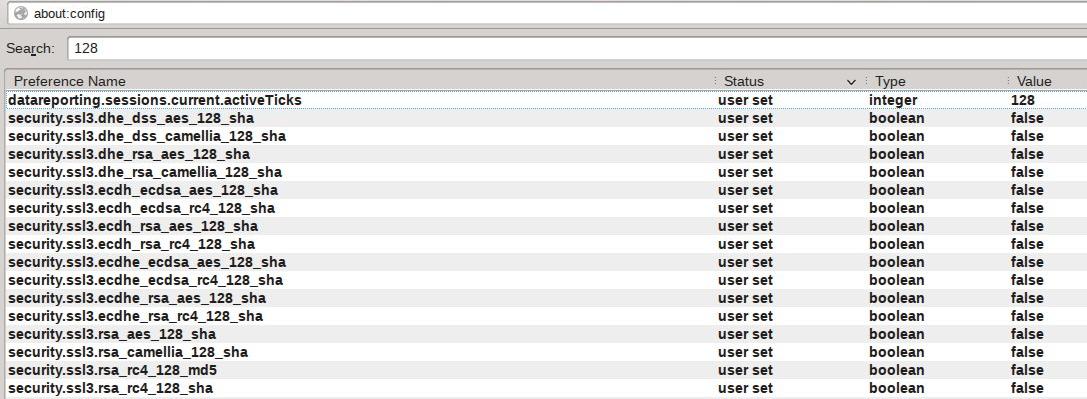
Type 128 in the search bar. Press enter. Now toggle the following entries to "False".


What is being done - we are disabling the low bit rate ssl to force use a higher grade encryption.


Now type 256 in the search bar. Press enter. Now toggle the following entries to "True" if they are not already set to "True".


What is being done - we are using setting SSL to use a higher grade encryption.


Type 'ssl.' That's ssl and a '.' in the search bar. Press enter. Now toggle the following entries to "True".

What does these setting do -

security.ssl.enable_false_start - "True" will help speed up the ssl lookup.
If this setting breaks the site that you use, set to "false"

security.ssl.require_safe_negotiation - "True" make sure that any possible Man-in-the-middle attacks are stopped.
If this setting breaks the site that you use, set to "false" 

security.ssl.treat_unsafe_negotiation_as_broken - "True" make sure that any possible Man-in-the-middle attacks are stopped.
If this setting breaks the site that you use, set to "false" 

Type 'geo.enabled' in the search bar. Press enter. Now toggle the following entries to "False".

What does the setting do - It disables the geographical tracking that is enabled by default. Improves privacy while web surfing.

With these simple tweaks you can enable a much safer web surfing experience. Sometimes few web sites may not work properly when using higher grade encryption (which is a bad design fault at there end - really) . In that case just temporally enable one of the 128 bit setting and reloaded the page to make them work (disable normally). Happy safer web surfing.

Thursday, August 9, 2012

Musing on Windows 8

MS has released Windows 8 RTM and very soon the product will see a worldwide release . I have been using the Windows 8 Developer preview. Here is my personal take on Windows 8 Dev experience ---

Pros ---

Is arguably the fastest Windows version with supported hardware.
Security is built upon and improved since windows 7 days.
Over all RAM requirement has reduced (services and apps takes less RAM as compared to Windows 7)
Spot fixing and live repairing of NTFS volumes is very cool.
Power management features are very good.
Would make a good OS on tablets and on the go/live/connected laptops/ultra-books etc (lots of improved wireless connectivity options)
Metro UI or the simple phone'ish UI is good for new users/people used to mobile phones menus/system.

Cons ---


On older hardware you will have to manually install the latest drivers. I tested with a mobo that has as Intel G33 graphic card... unlike Windows 7 which installs the base driver Windows 8 does not only a basic driver is installed. So if you are planning to use it on old or even ancient hardware hmm... keep hunting fro drivers.

Metro sucks!!! Power users struggle with it (my personal opinion). It may be the next big thing in GUI but I have older hardware (no touch and pen input device)
The old Classic Desktop still rules for my personal usage.
Open GL drivers not working for Intel hardware
The compatibility wizard really sucks and does not work many times, many popular apps that work fine under Win7 do not work e.g Virtual Box , open arena games , zenmap , SilkyPIC
The teal/green colors are a eye sore
Too much online/cloud this cloud that... if your work primarily is on apps/progs that require live Internet net access only some times e.g Photo editing/video edition/accounting etc you are much better off with Windows 7
The new STOP error screen totally sucks and if you are a windows power user/IT admin... you will be at a loss as hardly any useful info is provided on screen

Mix bag issues ---

These issues can be a boon or a ban, depending who you are. A simple end user or a IT admin/geek!!!

The OS even though in beta testing is very stable, and rock solid.
Automatic repair to the FS works very well.
Dual booting with another non MS OS is NOT a good thing.

The volumes under NTFS are monitored via CRC FS filters and transaction logging... even if you have not encrypted the volume ... the entire volume is monitored via low level File System Filters and check sum. Copying files to the drive from say a Linux live boot CD or Linux installed on another disk (with full NTFS read write support) would still result in marking the volume as bad.. will result in data loss.

Installing any new prog/app from the Internet goes through strict review of the "application compatibility database" which is maintained and controlled by MS... and flags many proper admin/IT tools as harmful/incompatible e.g nmap, wireshark, virtualbox. On the other hand this feature alone will stop many end users from installing any spyware/trojan laden progs/apps accidentally. As it clearly prompts the user to delete the file. In my beta testing I was not successfully in submitting apps/progs to the white-list even once.

If the OS crashes the automatic recovery is very good and work without any user intervention. Normal end user would be happy with this. Power users/IT admins would feel the pinch as the OS tries to hide as much of it core components that we are use to e.g the registry , STOP errors, last know recovery option, critical log files/folders are now even hidden from the administrator account. One has to go do some real reg hacking and xcals magic to access them.

Anti virus in the form of Windows Defender is just a rehash of Microsoft Security Essentials, with the same core engine, (which is again based of the Forefront engine)... I am a big fan of MSE as far as a free antivirus product goes.. It may not be the best or even the lightest on resources.. but is a very good addon for a free product.

IE or the loved/hated Internet Explorer.. truth be told it has improved in many ways and is very fast. The stability has also increased a lot since the old days (but security wise it is still an open question) I personally avoid using IE for any personal use as far as possible. That being said long time users will have a good experience to look forward to.

On the business end IE will not die, not yet. Do not be fooled by HTML 5/web apps hype bandwagon -- Two Words "Active-X" many big and small company still rely and work with Active-X ... prime e.g begin the various Sibel plug ins which are hugely popular as a CRM/B2B/B2C fronted

If you are the type of person that like to tweak/hack/modify you OS too the teeth, or just to try out something new Windows 8 will kinda disappoint you. MS is locking down the OS more and more overlaying the OS with dumb On/OFF options like that another OS ;) Many low level utilities and prog/apps will not work as a result of kernel level changes, driver/filter changes and sometime pure superficial blocks in places. On the other hand the fundamentals and base that the OS is based on is very solid. In fact from what I have seen so far at the low level and kernel design. I am very excited to see and test out the next Server version based and expanded o the same technologies. Em.. Windows 2013 Advance Server anyone ???

Sunday, November 13, 2011

Don't let the spammers get you!!!!!

A few days back I helped an acquaintance help recover and secure his/her cracked yahoo account. The hack was typical ruse played by the spammer, after taking over the account the entire contact book was copied. Deleted the original contact book from the email account. Make a fake new account by adding a letter to the original account. Set up a filter to auto forward all mails received to this account, also set a filter to add a blind carbon copy to another account (This is done so just in case the original account is recovered ... via password recovery and secret question. to monitor what is going on by the cracker).

The person concerned was worried as all his/her contact were deleted from the account and he/she suspected it was a hack attempt by a business rival. I had to scan ,examine and check the laptop for any attempt of deliberate cracking. The initial scanning and testing showed that the laptop was not secure by any stretch of imagination.

Multiple and glaring security omission were noted. The OS was not patched with any service packs and hot-fixes released thereafter. The account in use was an administrator level account. The system did had antivirus software installed ... but it was something I would not recommend to anyone. It has a known poor detection rate and does not protect from any web attacks like script based worms, code injection etc. Worst of all it does not have a dedicated anti root kit and anti spyware component. To top this all multiple Service Packs and patches were missing from popular software like MS office, web browsers, browser addons, old java virtual machine. All in all the system was crying to be taken over sooner or later.

Now on the actual ruse played by the cracker. As mentioned the cracker deleted the original contact list. Before doing this the entire address book was sent a mail .... this mail is typical of the phishing attack we see these days. All the contact were told that the owner of the account was stranded in Spain and had his/her Visa taken away. He/she pleaded them to send him money via online transfer so he/she could be back into his/her hotel and get back home safely. The actual account holder had been getting concerning calls since early morning from people all over the world. Some had also fallen for the con and replied to the mail

The reply was auto forwarded to the fake email account and details was sent back of a temporary western union transfer account to wire the money. Even a contact number was given in the fake mail. (Do not call such numbers as they could be ISD calls/Premium rate numbers or and even a collect call. You may end up paying a large amount in call charges). Sadly in this case a few people did sent some money. (If you are in such a fix always make sure to contact the actual person on his/her known landline or cellphone

The victim was educated on how to secure his/her laptop and update the OS and other software's. Email account setting were restored to normal, password changed and make use of strong password and features like Secure Text/Picture of yahoo. Account logs were checked to find that the crackers first accessed the account from Kenya and later from Australia. (At this point it is not clear if they were the same person/group using proxy servers or working over the Internet.)  All spoofed emails/headers/IP address details were noted and saved. The victim was advised to contact people in his address book to not to respond to any such emails. File a cyber crime report with the local cyber crime cell, and submit the details as evidence.

Conclusion: The ruse played on the emotion of the people in the address book to skim off money via online transfer. The address book was deleted to avoid let the people know that the mail was fake. If you have been using an email account for a long time, it is a good idea to take a backup of your contacts. Check all filters/forwarding setting and make use of all security features possible. Use common sense and contact the person on a known number to confirm of any such event.


P.S --- Case of the Internet con to get a good job!!!!!

Received a similar mail today that tries to exploit on another human emotion. This one is pure con, and promised you a very lucrative job offer. No hackers or hi tech involved.. in fact the attachment it's self is a plain text file. No virus or trojan etc. 


MARUTI SUZUKI INDIA LTD (MSIL)
Head Office Maruti Suzuki,
India Limited Nelson Mandela Road,
Vasant Kunj, New Delhi-110070.

REF: "MARUTI SUZUKI" DIRECT RECRUITMENTS OFFER.

Your Resume has been shortlisted for our new plant.The Company selected 45 candidates list for Senior Engineer IT,Administration,Production,marketing and general service Departments, It is our pleasure to inform you that your Resume was selected as one of the 45 candidates shortlisted for the interview.

The Company SUZUKI is the best Manufacturing Car Company in India, The Company is recruiting the candidates for our new Plants in Delhi,Bangalore, Pune and Mumbai.Your interview will be held at The Company Corporate office in New Delhi on 23rd of November 2011,at 11.30 AM, you Will be pleased to know that the 45 candidates selected 34 candidates will be giving appointment,Meaning that your Application can progress to final stage. You will have to come to the Company corporate office in New
Delhi,your offer letter with Air Ticket will be sent to you by courier before date of interview.

The Company can offer you a salary with benefits for this post 62, 000/- to 200, 000/-P.M. + (HRA + D.A + Conveyance and other Company benefits.The designation and Job Location will be fixing by Company HRD. At time of final process.You have to come with photo-copies of all required documents.

REQUIRED DOCUMENTS BY THE COMPANY HRD.
======================================
1) Photo-copies of Qualification Documents.
2) Photo-copies of Experience Certificates (If any)
3) Photo-copies of Address Proof
4) Two Passport Size Photographs.
5) Mobile Number


Please note: All requirement should be sent to this email:
maruti_cars@hotmail.com

You have to deposit the (Cash) as an initial amount in favor of our company accountant name in charges to collect your payment department for Rs.16,200/- ( Sixteen Thousand two hundred rupees ) through any [STATE BANK OF INDIA] OR [AXIS BANK] Branch from your Home City to our Company accountant name in charges. Account NO:,which will be sent to you upon your response. This is a refundable interview security. Your offer letter with Air tickets will be sent to your Home Address by courier after
receiving the confirmation of interview security deposited in any of the STATE BANK OF INDIA OR AXIS BANK.
This Company will pay all the expenditure to you at the time of face-to-face meeting with you in Company. The Job profile, salary offer, and date -time of interview will be mentioned in your offer letter. Your offer letter will dispatched very shortly after receiving your confirmation of cash deposited in STATE BANK OF INDIA OR AXIS BANK.
We wish you the best of luck for the subsequent and remaining stage.The last date of security deposits in bank is 20th of November, 2011. You have to give the information after deposited the security amount in bank to the Company HRD-direct recruitment via email.Your Offer Letter with supporting document will be dispatched same time by courier to your postal address after receipt of security deposited confirmation in bank. The interview process and arrangement expenditure will be paid by SUZUKI COMPANY.Lodging, traveling and local conveyance actual will be paid by MARUTI SUZUKI COMPANY as per bills. The candidate has to deposit the initial refundable security as mentioned by HRD.NB: You are advice to reconfirm your mailing address and phone number in your reply.And 16,200/(Sixteen Thousand two hundred rupees) will be the refundable amount,as 200rupees will be deducted as bank charges for funds deposit and if you are been selected or not, still the amount will be refunded to you,as the amount is just to prove that you will be coming for the interview in order for us not to run at lost after sending you the air ticket Offer Letter and you don't show up on the day of interview.

Wishing you the best of luck.

Regards,
Shinzo Nakanishi
Chief Executive Officer, Managing Director,
MARUTI SUZUKI INDIA LTD (MSIL)

_____________________________________________________________________________

Conclusion: Now you have to use common sense, some of the details may be true. But how in the heaven I am being offered a job at MARUTI SUZUKI when I did not even apply. My CV is not even online at any job portals :P :P LOL. By reading the text marked in RED, it should be very clear that this is an attempt to rip you off the money and IS TOTALLY FAKE.  Do not send any details or the money to them. A company like MARUTI SUZUKI (automobile makers) will never use a Hotmail id to send you official emails from HR.

Gmail is not marking such mail as spam right now. If you happen to get such a mail, mark it as spam. Report to the company involved of the ongoing scam. Tell the world, your friends and your dog about this. Save them all :)
Be safe...

Friday, November 4, 2011

Some personal musing on Linux...

Have been using Computers since early 80's old fond memories of chunky, springy old BBC micro keyboards back at school as small kids... staring at the small burning phosphor orange or green screens... it was all 'awe' and 'awesomeness' .. LOGO and turtle :D :D fun times.

Till early 90's I did not even own a personal computer... by mid-late when I did get one it costed an arm and leg. Had no idea about "free software"... back in the days one friend had a fast PC with the Pentium Pro chip ... we got hold of a Slackware CD via a popular computer mag.. booted with it and borked the windows 95 boot loader... I had to literately had to take the slack ;) for that... It was good I knew how to re-install Windows.

We had no Internet and support to speak of... First there was shell/acc (which was too expensive) and the dial up modems. I recall few people had heard of Linux/GNU in our circles. I once subscriber to a national level mailing list... as my software modem (sm56) would not work under Linux...  I was overwhelmed by the huge 
volumes of emails in my inbox. Over 300 mails in 2 days.. It did not make any sense too.. (to be true mostly flame wars and ego trips). Had to unsubscribe in just four days.  

I was given the typical RTFM treatment, and asked to grind the soft modem type advise... being on dial-up and raking up huge phone bills... where I was paying by the seconds did not help.. need less to say I was put off .... 
After a few years I did try Mandrake Linux and that did work with my dial up. I had to actually mail the maintainer of sm56 kernel module maintenance. He was kind enough to write out step by step commands. I did a actual compile of a custom kernel and module.. all without  realizing the depth or importance  of it. All I remember is that it took like three hours and forever.....  on my PIII :P

For years I did not look at Linux as a full time indulgence... things moved on the tech sphere.. was lucky to have indirect access to high speed Internet access via VSAT and ISDN via few government and research facilities. Saw them using Unix and Linux full time, the bug was on :)

A Indian tech mag had a big role in my trying Linux properly. There was a lot of useful discussion and proactive help. I even ended up been one of the unofficial beta tester for the distro they rolled out in '04, '05 and '06. After this there was a on and off spell of Linux Distro hopping ... Had a good run with the Sarge DVD... Fedora Core series. By now had seen all sorts of holy wars and flame wars on every thing under the sun from to call it GNU or not, KDE vs Genome, rpm vs apt vs yum, Windows vs rest of the to Open source world, happening/not happening Desktop Linux.  I had ADSL by this time, bills were reasonable now. 

Linux became main stream, at least usable for semi techie people. Lots of info on the Internet in the form of How-to, guides, web sites, and even videos. Major changes in hardware and better compatibly made things easy. Like all things tech ... things are moving at a rapid pace...  In all this my major observation is that the end user should have access to decent Internet speed. If he/she is driven enough the support and proper info can be found to make Linux work. Today points such as games/office suits/XYZ software on Linux is often mute. It works and works well indeed.
Major changes in hardware and virtualization technology, better and easy desktop environment, great hardware support in the latest stable kernels also made it easy for non *nix users to try out Linux and use it.  Now you do not have to a OS guru to install Linux. Don't want to install it just give a Live CD a try... it almost a non issue.

Now we are seeing a new wave of support issues, many places still don't have xDSL/cable or fiber. Many  people are on slow connections like GPRS, dial up even today. Many have just begun to taste the fruits of 3G wireless Internet. From what I have seen is 3G can be great enabler and can even used at places that do not have land-lines/xdsl. In this way my friends in the western countries are way better off.
For them it is just a matter of minutes or less then an hour at the maximum to try a new release DVD. On the other end for many of us it is still no fun to wait and keep downloading a DVD of around 4GB after several days. 
For what I see it is not some magical feature or the next killer app that helps in major Linux adaption, but it is rather the available of cheap data plans and faster Internet connection. Better hardware support for wireless devices like 3G HSDPA USB modems, pain less support for "tethering" with mobile phones. The Internet is "THE" medium of all types of content delivery , be it the all elusive killer cloud app or Linux adoption for the masses.    

Tuesday, August 9, 2011

Ridonklus I say!!!!!!!!!!!

Woke up this morning and logged into my Google+ plus account was checking out the updates from my various circles and enjoying my morning coffee. Noticed that the order of my circles were not at what I had set them at. Did not make a big deal of it... more coffee and surfing at Google+ ... As many of the regular readers of the blog will know that I am a big fan of KDE and digiKam photo management software. That from time to time I keep posting bits about both and beta test/file bug reports for them.

Along the same line I was testing and reporting an update for digiKam 2.0.0 ... it kept giving me an error "post could not be saved" as we know Google+ is still a public beta I thought it may be a temporary snag. Logged into my Facebook account and checked few updates ... the works ... now tried to post the update again on Google+ same error. Hmm what is going on ... well more checking of cool stuff at Google+ ....

Just happen to click on My Home link and BAM there it is !!!!! Oh the horror it seems my profile is suspended!!!!!!!!!!!!!! NOW wait a minute for what I say. I don't post Porn, nudity or hate speech in my circles. On the contrary have always helped fellow Google users with there problems. Have even help resolve and mitigate a nasty JavaScript worm that was spreading at Orkut in the past. Yes I am an early adopter of Google's Orkut Social network, have successfully manage and run huge community's at Orkut. My account is a verified one, have won several badges including "Uses most of orkut's features".


All the hoopla seems to be over the usage of "Monts Here". Well if it helps since day one I have had the same name on arch rival social network Facebook. All my friends know and call me 'Monts'. I am a amateur photographer and watermark/label my photographs with "Monts Here". I have the same name/id on Google's another social network photo sharing site Panoramio (http://www.panoramio.com/user/5700136) This was indeed much before the launch of Google+. On another popular photo sharing site Flickr I go by the ID 'Monts 4 ya' and that is indeed an old account. I have even posted photos back in 2006-2007.

"Please remember that we are currently limiting profiles to individuals and will be launching a profile for businesses and other entities later this year." Is what G+ says. I clearly state that I am a passionate armature photographer. It is not my profession, I do not make money from it. Nor do I sell any photography related product or services. I am a computer tech by profession and very clearly stated that on my G+ profile as well as my blog over here. however I do not sell any computer product, service or even support of any type on these social networks. The Google+ profile just like my Facebook profile is a personal one.

Well as a popular joke goes in India .. does all this has the hand of a foreign conspirator power ;) :p :p  or have I irked someone so much they are reporting that my profile is a fake one ??? hmm well could be or then maybe not... thought it does feel flattering to think so ;)
Google+ has been suspending the accounts with commercial id's and pseudo names... so for now at least I will rule the above conspiracy theories out. Do I think it is a bad thing ... well not really. It is a good thing and will keep things clean, good for security. Thankfully Google is not a one way street and they do listen to user feed back. All other Google services are working like gmail, blogger etc .... If those were blocked too that would have really made me mad indeed. 

So I here you saying 'Monts... so what is the ranting all about...' Well for once I would like to leverage the power of social networking for personal ends. I would request you to share the link to this post in your circles and friends on Google+. I have already filled the form to remove the ban. I have good faith in Google, but it never hurts if you have a few friends lobbying for you cause. Please post and re post on Google+ Thanks
Feedback from the whole episode :
  • If and when a Google+ account is suspended for now you do not have any auto feed back. A mail would have been very polite. Thank you Google.
  •  If you are active on a social network, normally you fill out 'about me' once and hardly update/edit the details every other day. No I am not self obsessed and do not check the about Me page everyday.
  • By default one goes to the Stream page on Google+. The suspension note should be displayed there. UI/coder at Google+ should look into this. Accessibility tip :) 
  • Kudos to Google of having the common sense of not disabling/suspending all other Google services linked to the account. As was reported before, that would have enraged me.
It is good that there is a link that lets you appeal against  the ban. But then "Reviews are usually completed within a few days." Bummer. Need for speed faster and better please few hours not days ... :D  Now hoping that the account will be back to normal very soon. :D Thanks all.

Saturday, February 12, 2011

Quick and easy way to block ad's and spam in Fedora Linux

How many time we all wished that the web site or web page you where visiting would load up faster. Now a days no matter what site you visit blogs, news, forums, portals or generic web sites. They all are littered with all sorts of java scripts,flash animations, java applets, active-x controls and cross feeds via dynamic html/scripting to one or more advertising servers. If you have ever noticed the bottom of the web browser while opening any standard site such as Facebook, Orkut, BBC news etc, you will see the web browser trying to connect to many different sites and many many different sub domains.

Most of big sites pull content from many different sites and sub domains. At times the main site that you are trying to reach would not even load completely. All because of a slow ad server or sub domain from where it is pulling up the info or advertisement. To get out of this rut we have to refresh the page many times in hopes of the entire content being loaded. There are a few ways to get around this, today we will look at one such very easy way. This method has the added advantage that it blocks out known bad/evil domains that server Malware, Spyware and Spam. This also provides an extra layer of defense against all those hackers and script kiddies so eager to steal your data, cookies, web logins and your peace of mind in general.

Under most *nix like system the web address is first check against the HOST file. If a match is not found a DNS lookup is done for the IP address as the web browsers works on IP internally over HTTP/FTP(s). What we will do is use the host file to block unwanted domains and IP addresses.... Aha you say old trick what's so great about it.. well for starters we will use some bash script magic to automate this for us.  The list(s) comes from very well know sources like WOT/mvps.... so lets get to it. You will need the following tools installed (these are pre installed in Fedora) wget unzip dos2unix grep. If for some reason your system does not have any of these do a quick 'yum install' to install the missing tool. Copy and paste the code below and save as hostup.sh

****************
!/bin/bash
# uphosts - Hosts File Updater
# README:
#original script found at http://guide.debianizzati.org/index.php/UpHosts
#Bad hosts are blocked putting them in the hosts file as 0.0.0.0
# To add other sources script must be manually modified
# Permanent entries must be added to the original file
# THIS SCRIPT HAS NO WARRANTY !
# Thanks to:
# http://ubuntuedintorni.wordpress.com/2009/06/29/di-script-dns-e-file-host/
# http://hostsfile.mine.nu/downloads/updatehosts.sh.txt
# 20101216 Paolo
# has been modified to work under Fedora/RHE /CentOS
#-----------------------------------------------------------------------

HOSTSPATH="/tmp/hosts-`date +%s`"               # Temp directory
HOSTSFILE="/etc/hosts"                          # Hosts file
ORIGFILE="$HOSTSFILE.original"                  # Backup file

CONFDIR="$(dirname $(readlink -f $0))"  # Parent directory of the script
BLACKLIST="$CONFDIR/uphosts-blacklist"  # Local Blacklist
WHITELIST="$CONFDIR/uphosts-whitelist"  # Whitelist

PROXYUSER="" #PROXYUSER="--proxy-user=user.name"
PROXYPASS="" #PROXYPASS="--proxy-password='password"

DAYS="2" # Update frequency
#-----------------------------------------------------------------------
# Checks for root privileges
if [ "$(whoami)" != 'root' ] ; then
        echo "You need to be root to execute uphosts. Exiting!"
        exit 1
fi

# Checks required packages
ABORT=0
builtin type -P wget     &>/dev/null || { echo -n "wget is missing."; ABORT=1; }
builtin type -P unzip    &>/dev/null || { echo -n "unzip is missing."; ABORT=1; }
builtin type -P dos2unix  &>/dev/null || { echo -n "dos2unix is missing."; ABORT=1; }
builtin type -P grep     &>/dev/null || { echo -n "grep is missing."; ABORT=1; }

if [ $ABORT != 0 ] ; then
        echo " Exiting!"
        exit 2
fi

# Limits updates if uphosts is run often (i.e. at every if-up)
# If there is no original hosts file this is the first run on a fresh system, and update runs anyway
if [ -f "$ORIGFILE" ] && [ `find $HOSTSFILE -mtime -$DAYS` ] ; then
        echo "$HOSTSFILE is less than $DAYS days old. Exiting!"
        exit 3
fi
************
This script need Root to execute. Make the script executable by doing a #chmod +x ./hostup.sh
now run the script #./hostup.sh [You should see something like this]
Retrieving hphosts from http://support.it-mate.co.uk/downloads ... OK
Retrieving hphosts-partial from http://www.hosts-file.net ... OK
Retrieving mvps from http://www.mvps.org/winhelp2002 ... OK
Merging lists ... OK
Writing hosts file /etc/hosts ... OK
Update process complete - 134929 hosts blocked!

That's it and we are done. Enjoy a safer and fasted web experience.

P.S - In a perfect world I should have unlimited bandwidth and money ;) .... But alas though this method is great and saves a lot of pain and manual effort. It sometimes does block some sites and forums from loading properly.. if that is the case just open the hosts file in vi
#vi /etc/hosts and add a "#" to comment the site to unblock it. Do not forget to save the hosts file. Refresh the page in your browser.

Thursday, November 11, 2010

Complete migration to Linux ... well almost :P II

After several hours of grinding by chkdsk /f ... I lost count and grabbed some shut eye for few hours early morning.  When I finally woke up I rebooted the OS ... it would still not start in normal mode.. tried the safe mode.. it finally booted in safe mode...  just like a parents instinct to protect his/her children my first thoughts were to save the data...... Now when I say data ... it is really a mix bag of full length movies, documentaries, digital pictures from the past several years, software, e-books, source code, tools, text files, html, zip, rar, license files and hash keys, ISO's of several Linux distros and random random crap that has somehow manged to survive the transfusion from a 20 GB hdd from some 6 or 7 years back via systematic update to a 1 TB hdd and even I don't know what it is used for or if it is of any use now.. :| :o

Then there were small small reg scripts and batch/vbs files to tweak this or that 'feature', browser bookmarks and settings (Firefox tweaks, noscripts , adblock plus rules), HOSTS file, DNS files, backup of random downloads in the Desktop of various users profiles... (aside/ I was using the system with a GUEST level account full time, yeah I am paranoid about security. Frankly win7 is the only Microsoft OS that will let you do it without major pains. Vista did not happen to me never used it personally nor will.... /aside) Needless to say backing up files manually (copy pasting the setting tweaks) as small as a few kb to several MB did not seem exciting... The worst was yet to come......